Are you struggling with KRA Etims registration? If yes, you want to read this to the end….i will share with you the step-by-step way of registering for KRA eTims in Kenya..
Let’s get started:
KRA Etims Registration – step by step
Step 1:Go to KRA Etims Sign-up Portal and create an account/sign up
So go here: etims.kra.go.ke and click on sign-up
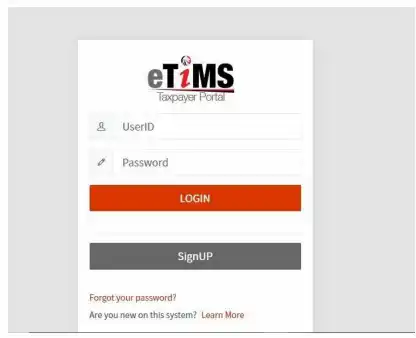
Step 2: Open ‘PIN’ section (simply click on it)

Step 3: Type your KRA PIN (accurately) and click ‘Verify’
Ensure that your PIN you capture correctly.
Step 4: Set a good password, Verify it
Now you are prompted to set a personalized password- do that (type it) and make sure you mix letters (ABCD….abcd…..), numbers (0-9), special characters($@#^&*…) then click on “confirm ‘password’”
Once done, press/tap ‘Send OTP’ button – an OTP will be sent to your legit mobile number (the one you use on KRA iTax)
So the next step is to type in the Security/OTP code that just came to your phone.
Now you are almost through with the KRA eTIMS portal sign up process but you must review(read) the ‘Data Privacy statement’ and Confirm(click to confirm)
Finally, tap on(click) “Sign-Up” button – then “YES”.. that is the end of your KRA etims registration/sign-up.
KRA Etims Registration – proceed with these steps now
Send Your KRA eTIMS Registration Request
The first step here is to send your newly registered eTIMS registration service request to KRA portal as follows:
Log in to your KRA eTIMS Portal
Visit eTIMS Portal once more (type etims kra on your browser) and sign in -use your KRA PIN and of course, the password you just created.

Open eTIMS Registration Page
Next, look for Service Request option inside the screen (top right side).
Click on it then choose eTIMS.. you will see other options provided(ignore them).
Choose the Correct eTIMS Option
Under Item Type, click the option matching your business.
E.G. if you sell services such as cleaning and upholstery, and not physical products, you may choose Online Service.
Upload the Asked For Documents
Go ahead and upload clear copies of documents that the portals asks for.
For example:
- Director’s ID Card or Passport copy
- eTIMS Acknowledgement & Commitment Form (signed)
Submit Your Application
Now click Send to submit your application.
Immediately, a confirmation message appears on your screen.
Click on “Yes” to complete everything.
Wait for approval from KRA….it usually takes just a few seconds/minutes so keep checking your phone for the sms.

KRA Etims registration -Conclusion
So, that is how you register for KRA Etims in Kenya and as you can see, it is pretty straightforward.
And don’t forget that all businesses need to have etims from the financial year 2026 to be compliant for tax purposes so it is an important thing to do.
Need Help
Call us on 0700 650900 if you’d like us to do it for you….we charge just kshs.3000 and we complete it within 2 days..
No need to hassle on your own..our team is waiting.
PS: Keep it here for our next blog post that will be teaching you how to generate receipts and invoices using your etims.
ALSO SEE: